What Is an MCP Server? A Business Guide
What you'll learn
- What an MCP server actually is, in plain language
- The integration problem MCP was built to solve
- Where MCP creates real business value
- MCP versus traditional API integrations
- Real limits to plan around
- How to start without overbuilding
An MCP server is a small piece of software that lets an AI model securely connect to one of your systems, read information from it, and in many cases take real action inside it, using one standard protocol instead of a custom integration for every tool. If you have heard the term MCP (Model Context Protocol) and want the short version before you decide whether it matters for your business, that is it.
TL;DR: MCP is an open standard, originally released by Anthropic, that defines how AI applications discover and use external tools and data. Instead of building a one-off connection between each AI model and each business system, you build one MCP server per system, and any MCP-compatible AI can use it. For most businesses, the practical question is not whether MCP matters, it already does, it is which one or two systems are worth connecting first.
The Problem MCP Was Built to Solve
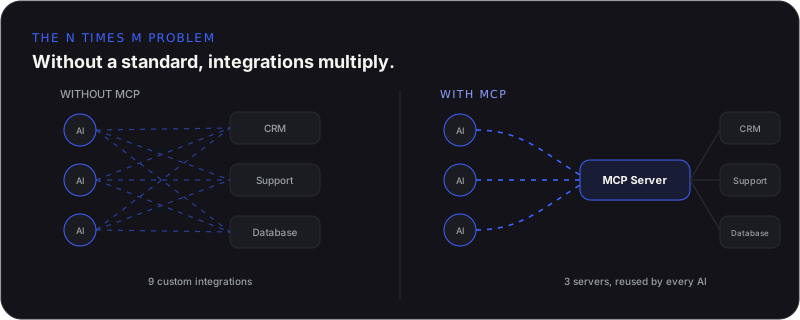
Before MCP, connecting an AI model to your CRM, your support desk, and your internal database meant three separate, custom integrations. Add a second AI tool and you are maintaining six. This is sometimes called the N times M problem: N different AI applications multiplied by M different business systems equals N times M custom integrations, each one built, tested, and maintained separately. For a company running a handful of AI tools against a dozen internal systems, that math gets expensive fast.
MCP replaces that grid with a single interface. You build one MCP server for your CRM. Any MCP-compatible AI assistant, whether it is Claude, an internal agent, or a future tool you have not adopted yet, can use that same server without custom wiring. The integration work happens once, per system, instead of once per pairing. Anthropic open-sourced MCP in November 2024 for exactly this reason, and the protocol has since been adopted by other major AI providers and donated to the Linux Foundation as an industry-wide standard.
What an MCP Server Actually Does
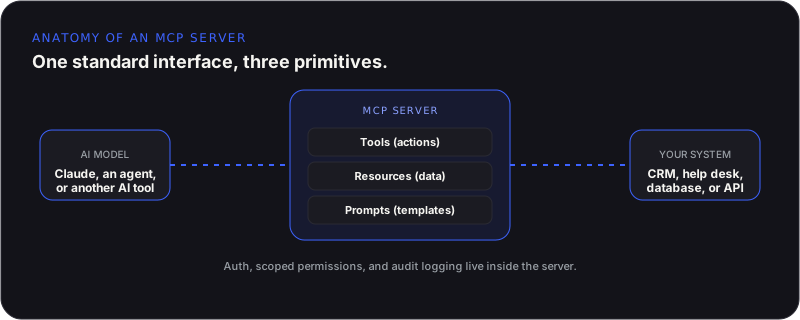
Underneath the acronym, an MCP server exposes three kinds of things to an AI model: tools, resources, and prompts. Tools are actions the model can call, like creating a support ticket or updating a record. Resources are data the model can read, like file contents or database rows. Prompts are pre-built templates that guide a specific workflow. Together, they give an AI model a defined, permissioned way to interact with a system instead of guessing at an API it was never trained on.
This is also why MCP is often described as a USB-C port for AI. USB-C did not make devices smarter, it made them plug into anything without a different cable for every combination. MCP does the same job for AI and software: it standardizes the connector, not the intelligence.
Where MCP Creates Real Business Value
- Customer success: an agent pulls renewal dates from your CRM, usage data from your product analytics, and recent tickets from your help desk to produce a ranked at-risk account list in minutes instead of hours
- Support and internal help desks: an agent reads your ticketing system and knowledge base directly instead of relying on a static export
- DevOps and incident response: an agent connects to your issue tracker, monitoring tool, and chat app to speed up how fast incidents get acknowledged and routed
- Finance and reporting: an agent queries your data warehouse directly to compare periods and flag the biggest variances
- Sales and internal tools: an agent looks up pricing, specs, and account history across systems without anyone copying data between tabs
The common thread is not novelty, it is removing the manual work of pulling data from three or four places before a person or an AI can actually answer a question or take an action.
MCP vs Traditional API Integrations
- A traditional integration is built for one specific pairing of tool and system; an MCP server is built once per system and reused by any compatible AI
- A traditional integration usually exposes whatever the API allows; an MCP server exposes a curated set of tools and resources with scoped permissions
- A traditional integration needs custom auth and logging for each connection; a well-built MCP server centralizes auth, permissions, and audit logging in one place
- A traditional integration locks you to whichever AI vendor you built it for; an MCP server lets you swap or add AI providers without rebuilding the connection
MCP does not replace APIs. Your MCP server still talks to your system through its existing API. What MCP standardizes is the layer between the AI model and that API, so the model does not need a bespoke integration for every tool it touches.
The Limits Worth Planning Around
MCP is genuinely useful, but it is not a silver bullet, and treating it like one leads to disappointing results. A few limits matter for planning.
- Latency: MCP adds a real-time round trip between the model and your system, which makes it a poor fit for anything that needs instant response, like a checkout flow or live trading
- No synchronization: MCP lets an AI read from and act on a system, it does not reconcile data between systems. If your CRM and support tool disagree about a customer, MCP will surface that disagreement, not fix it
- Security surface: an MCP server that exposes write access to a system needs the same access control, scoping, and audit discipline you would demand of any other privileged integration
- Build complexity: a demo MCP server is a weekend project. A production one that handles auth, permissions, error handling, and real business logic reliably takes real engineering time
How to Start Without Overbuilding
The businesses getting the most out of MCP right now are not connecting everything at once. They are picking one internal system where an AI agent already has clear, high-value work to do, usually a CRM, a support desk, or an internal knowledge base, and building or adopting one well-scoped MCP server for it first. That gives you a working example, real usage data, and a template for deciding what to connect next.
- Pick one system with obvious, repeated manual work around it
- Decide what the AI should be allowed to read versus allowed to change
- Build auth, scoping, and logging in from day one, not after a problem
- Check whether a public MCP server for that system already exists before building a custom one
- Measure the actual time saved before connecting a second system
This mirrors how we approach AI infrastructure generally: start where the manual work is obvious and expensive, prove the value, then expand deliberately instead of building a sprawling system nobody asked for.
Final Thoughts
MCP is not another AI trend to watch from a distance, it is becoming the standard plumbing that lets AI models do more than talk. The question worth asking is not whether your business needs MCP in the abstract, it is which one system, connected securely, would save your team the most time this quarter. Answer that first, and the rest of the architecture follows.
Related from Agentiq Studios: Custom MCP Server Development and MCP, Plugins & Custom Extensions.