What Is RAG? A Simple Guide for Business Owners
What you'll learn
- What RAG actually is
- Why businesses are adopting RAG
- Common business use cases
- How RAG improves accuracy while lowering costs
If you’ve been researching AI, you’ve probably come across the term RAG, Retrieval-Augmented Generation. It sounds technical, but the idea is surprisingly simple.
Imagine asking an AI assistant about your company’s refund policy. Instead of answering based on your policy, it gives you a generic answer it learned from the internet. Technically a good answer, but the wrong answer for your business. That’s exactly why RAG exists.
TL;DR: RAG connects an AI model to your own documents so it answers from your actual policies and data instead of guessing from general internet knowledge. It works in two steps: search your information first, then generate the answer from what it finds. Most businesses use it for support, internal knowledge search, and anywhere accuracy and sources matter more than general conversation.
The Problem With General AI
Large AI models know a lot. But they don’t know your business. Not your products. Not your pricing. Not your SOPs, contracts, policies, or customer history. Without that knowledge, AI has to guess. That’s rarely what businesses need.
So, What Is RAG?
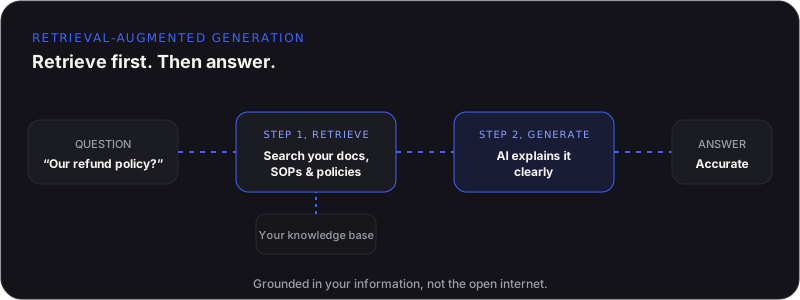
Think of RAG as giving AI access to your company’s brain. It doesn’t just rely on what the model already knows. It searches your own information first, then uses that to answer. Find the right information, then explain it clearly. That’s the whole idea. Researchers at Meta AI first described the technique in 2020. It’s now the standard way businesses ground AI in their own data, instead of retraining a model every time something changes.
A Simple Example
Someone asks, “What’s our onboarding process for new enterprise clients?” Without RAG, the AI doesn’t know. It guesses. Or it gives a generic answer. With RAG, it searches your onboarding documentation instead. It finds the latest process. It summarizes it. It answers follow-ups and points to the original document. Retrieve first, then answer.
Why Businesses Love RAG
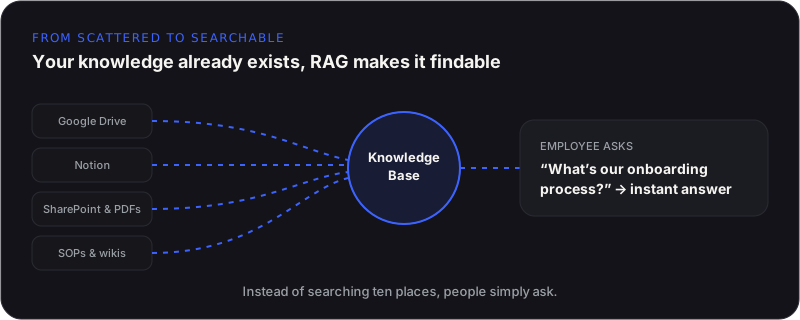
Most businesses already have valuable knowledge. The problem is finding it. It’s spread across Drive, Notion, SharePoint, PDFs, SOPs, emails, wikis, and CRMs. Employees waste hours searching, asking coworkers, or waiting for an answer. RAG changes that. Instead of searching ten places, employees simply ask.
Where RAG Creates the Biggest Impact
- Enterprise knowledge search across years of documentation in seconds
- Customer support that answers from your help center and policies
- HR & internal support for leave, reimbursement, and onboarding questions
- Sales teams finding pricing, proposals, and specs instantly
- Technical documentation search using natural language
Does RAG Replace AI?
No, it makes AI better. Think of AI as a very intelligent employee. Now give that employee instant access to every document your company has ever created. The AI still performs the reasoning; it simply reasons using your company’s knowledge instead of general information.
RAG Can Also Reduce AI Costs
RAG doesn’t just improve accuracy, it often reduces operating costs. With RAG, the AI receives the exact information it needs before generating a response. That means better answers, fewer mistakes, smaller prompts, and less unnecessary processing, often allowing businesses to use smaller or open-weight models without sacrificing quality. If you are weighing RAG against retraining a model outright, RAG vs fine-tuning walks through exactly when each makes sense.
Related from Agentiq Studios: RAG Development, RAG Deployments, and industry pages for Legal and Enterprise.
What a RAG Rollout Actually Looks Like
Most RAG projects follow the same rough shape, whether the business is ten people or ten thousand. It starts with picking one knowledge source, not all of them. Trying to index every wiki, drive, and inbox on day one is how projects stall before they ship anything. Pick the single source people ask about most, usually support documentation, SOPs, or product specs, and get that working end to end first.
- Clean the source first. A RAG system answers as well as the documents it reads. Outdated pages, duplicate versions, and conflicting policies produce confident, wrong answers before you touch a single line of retrieval code.
- Index it, then test it against real questions. Not the questions you assume people ask, the ones support tickets and Slack threads show people actually asking.
- Add citations from day one. Every answer should point back to the document it came from, so people can verify it and trust it faster.
- Watch what it gets wrong. The first two weeks of real usage tell you more about where your knowledge base has gaps than any planning session will.
The mistake we see most often isn’t technical, it’s scope. Businesses try to connect everything at once instead of proving the idea on one knowledge source first. A working RAG system over one well-maintained source beats a half-connected system spanning ten messy ones, every time.
Final Thoughts
Businesses don’t suffer from a lack of information, they suffer from a lack of access to it. Your team already has the answers; they’re just buried across documents, systems, and years of accumulated knowledge. RAG connects all of that into one intelligent system. Instead of searching, people simply ask. That’s often the difference between AI that feels impressive and AI that becomes genuinely useful.