Why Most Businesses Overpay for AI (And How to Avoid It)
What you'll learn
- Why AI costs increase over time
- When to use local AI models
- How fine-tuning reduces operational costs
- Building scalable AI without expensive infrastructure
When businesses think about AI costs, they usually focus on one thing: “How much does GPT cost?” That’s actually the wrong question. The real cost of AI isn’t the model. It’s the architecture behind it.
We’ve seen businesses spend thousands of dollars every month because every single workflow, chatbot response, and automation calls a large AI model, even when it doesn’t need to. The surprising part? Many of those costs can be reduced dramatically without making the AI any less capable.
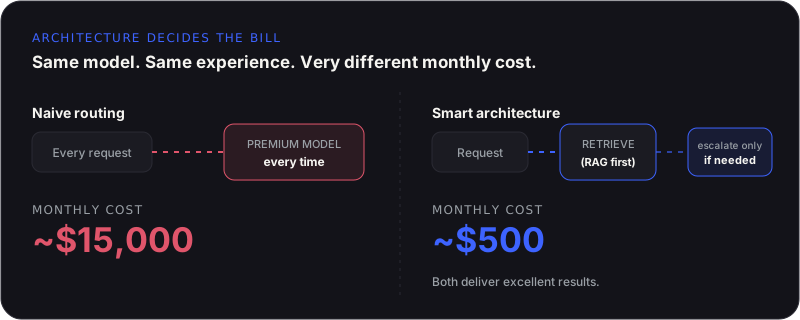
TL;DR: most AI overspend comes from routing every request, simple or complex, through the same expensive model. Splitting work into three tiers, no AI, lightweight AI, and advanced AI, then routing each task to the cheapest tool that reliably handles it, is usually what separates a $500-a-month system from a $15,000-a-month one running the exact same workload.
AI Doesn’t Have to Be Expensive
There’s a common misconception that building AI automatically means high monthly bills. The companies spending the most on AI aren’t always doing the most, they’re often using AI inefficiently. Good AI engineering isn’t about using the biggest model available. It’s about using the right tool for the right job.
Every Task Doesn’t Need AI
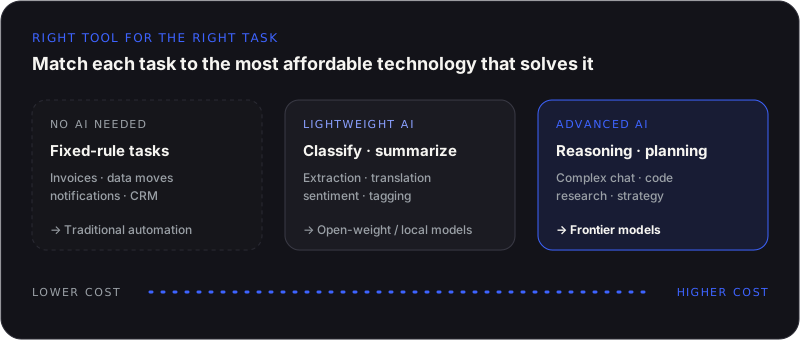
One of the first things we do during an AI project is divide work into three categories.
Tasks that don’t need AI, repetitive processes with fixed rules like sending emails, moving data between systems, creating invoices, updating CRMs, and scheduling. Traditional automation handles these perfectly; using AI here just increases your costs.
Tasks that need lightweight AI, basic document classification, simple summaries, text extraction, translation, sentiment analysis. Modern open-weight models like DeepSeek, Kimi, Qwen, Llama, and Mistral often deliver excellent results here at a fraction of the cost, and can even run on your own infrastructure.
Tasks that need advanced AI, multi-step planning, complex conversations, strategic recommendations, code generation, research. This is where models like GPT, Claude, or Gemini deliver exceptional value. The key is using them only where they create measurable impact.
Local Models Are Better Than Most People Think
A few years ago, if you wanted AI you paid for API access. Today, open-weight models have improved dramatically. Pricing comparisons across providers show open-weight models running at a fraction of frontier API pricing, while the quality gap on most benchmarks has narrowed to single digits. For many internal applications they offer more than enough capability while giving organizations real advantages:
- Lower operating costs
- Better data privacy
- Greater control
- Predictable infrastructure expenses
- No dependence on external APIs for every request
Fine-Tuning Changes the Economics
Trying to solve every problem with a general-purpose model is a mistake. Sometimes it’s more efficient to teach a smaller model exactly what your business needs. A fine-tuned model understands your terminology, products, workflows, documents, and communication style, producing faster responses, more consistent outputs, lower operating costs, and better user experiences. It is a different fix than RAG: fine-tuning changes how a model behaves, RAG changes what it knows, and our Fine-Tuning & Model Optimization work usually starts by figuring out which gap you actually have before touching either.
Sometimes the Best AI Is No AI
During discovery, we occasionally recommend removing AI from part of the workflow, because automation alone solves the problem. If a process follows clear business rules, adding AI just introduces unnecessary complexity and cost. AI should only be used where intelligence is genuinely required.
Smart Architecture Saves More Than Smart Models
Imagine two businesses building the same support platform. The first sends every message directly to a premium model. The second searches the company’s knowledge base first, retrieves the answer if it exists, and only calls a premium model when extra reasoning is needed. Both deliver excellent experiences, only one spends significantly less every month. That’s the power of architecture.
How We Think at Agentiq Studios
One of our core principles is simple: use the simplest technology that reliably solves the problem. Sometimes that’s GPT, Claude, or Gemini. Sometimes it’s DeepSeek or Kimi. Sometimes it’s a fine-tuned local model. Sometimes it’s traditional automation. We describe our approach as Cost-Optimized AI Engineering, we optimize for sustainable businesses, not impressive demos. It is the same audit we run in our AI Infrastructure Audit engagement, mapped against your actual usage instead of a vendor demo.
Related from Agentiq Studios: AI Infrastructure Audit, Fine-Tuning & Model Optimization, and Enterprise AI Models.
Where the Waste Actually Hides
When we audit an AI bill, the waste is rarely one obvious mistake. It is usually three or four small ones stacked on top of each other.
- Every request re-sends context the model already saw. Long system prompts and full conversation history get resent on every call, even when a shorter, cached version would work just as well.
- Simple classification or extraction tasks route through the same premium model as complex reasoning tasks, because nobody split the workload by difficulty.
- Retries and error handling call the model again instead of failing gracefully, quietly doubling the bill for the same request.
- Nobody is watching the trend line. Costs creep up 5 to 10 percent a month as usage grows, and by the time someone notices, it has doubled.
None of these show up in a single alarming spike. They show up as a bill that is 3 to 5 times higher than it needs to be, with no single line item that looks obviously wrong. That is exactly why they survive so long uncaught, and exactly what a proper cost audit is built to find.
Final Thoughts
AI costs don’t become expensive overnight, they grow gradually. Every unnecessary API request, oversized model, and inefficient workflow becomes a significant operational expense over time. The businesses that succeed with AI won’t necessarily have the biggest models. They’ll have the smartest architectures, a far more sustainable competitive advantage.